
How to identify your MacBook model
Find your MacBook's name, A-number and model identifier
There are two easy ways to find out which MacBook you have.
Method 1: About This Mac
- 1Click the Apple menu in the top-left corner and choose About This Mac.
- 2The window shows your MacBook's name, size, chip and year, for example MacBook Air 13-inch, M2, 2022.
- 3For the model identifier (for example Mac14,2), click More Info, then System Report. It is listed under Hardware Overview.
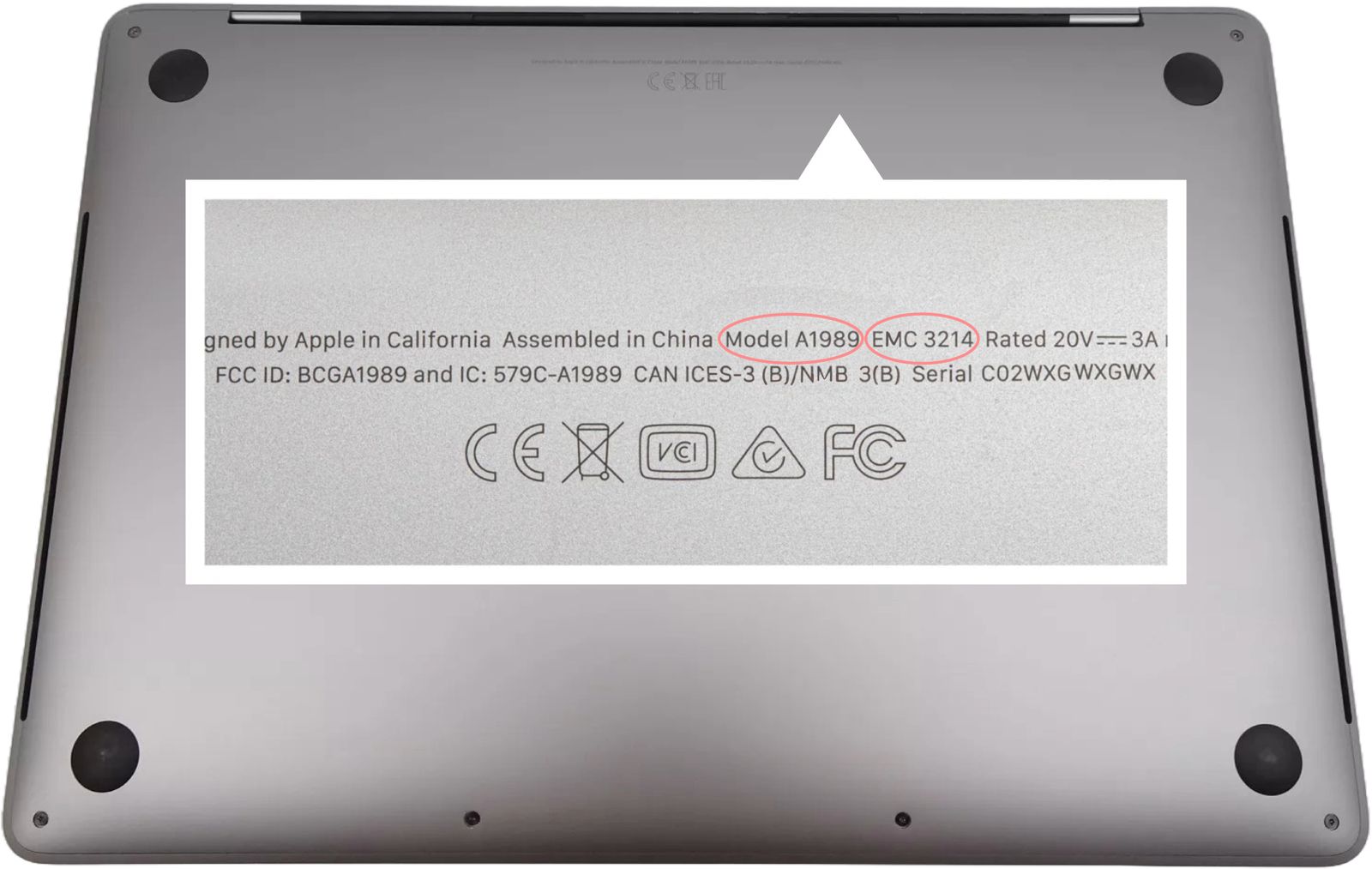
Method 2: Check the bottom case
- 1Close the lid and turn your MacBook over.
- 2Look for the small text near the regulatory markings. The model number starts with A, for example A2681.
- 3Match the A-number in the table below. Some A-numbers cover more than one year or chip, so use About This Mac to confirm.
MacBook model number lookup
49 models listed. Last updated October 2026.
| Model | Model number | Model identifier | Released | Sell |
|---|---|---|---|---|
| MacBook Pro 16-inch (M5 Pro, 2026) | A3428 | Mac17,6, Mac17,8 | 2026 | Sell MacBook Pro 16-inch (M5 Pro, 2026) |
| MacBook Pro 16-inch (M5 Max, 2026) | A3429 | Mac17,6, Mac17,8 | 2026 | Sell MacBook Pro 16-inch (M5 Max, 2026) |
| MacBook Pro 14-inch (M5 Pro, 2026) | A3426 | Mac17,7, Mac17,9 | 2026 | Sell MacBook Pro 14-inch (M5 Pro, 2026) |
| MacBook Pro 14-inch (M5 Max, 2026) | A3427 | Mac17,7, Mac17,9 | 2026 | Sell MacBook Pro 14-inch (M5 Max, 2026) |
| MacBook Air 15-inch (M5) | A3448 | Mac17,4 | Sell MacBook Air 15-inch (M5) | |
| MacBook Air 13-inch (M5) | A3449 | Mac17,3 | Sell MacBook Air 13-inch (M5) | |
| MacBook Pro 14-inch (M5, 2025) | A3434 | Mac17,2 | 2025 | Sell MacBook Pro 14-inch (M5, 2025) |
| MacBook Air 15-inch (M4, 2025) | A3241 | Mac16,13 | 2025 | Sell MacBook Air 15-inch (M4, 2025) |
| MacBook Air 13-inch (M4, 2025) | A3240 | Mac16,12 | 2025 | Sell MacBook Air 13-inch (M4, 2025) |
| MacBook Pro 16-inch (M4 Pro or M4 Max, 2024) | A3403 | Mac16,5, Mac16,7 | 2024 | Sell MacBook Pro 16-inch (M4 Pro or M4 Max, 2024) |
| MacBook Pro 16-inch (M4 Pro or M4 Max, 2024) | A3186 | Mac16,5, Mac16,7 | 2024 | Sell MacBook Pro 16-inch (M4 Pro or M4 Max, 2024) |
| MacBook Pro 14-inch (M4 Pro or M4 Max, 2024) | A3401 | Mac16,6, Mac16,8 | 2024 | Sell MacBook Pro 14-inch (M4 Pro or M4 Max, 2024) |
| MacBook Pro 14-inch (M4 Pro or M4 Max, 2024) | A3185 | Mac16,6, Mac16,8 | 2024 | Sell MacBook Pro 14-inch (M4 Pro or M4 Max, 2024) |
| MacBook Pro 14-inch (M4, 2024) | A3112 | Mac16,1 | 2024 | Sell MacBook Pro 14-inch (M4, 2024) |
| MacBook Air 15-inch (M3, 2024) | A3114 | Mac15,13 | 2024 | Sell MacBook Air 15-inch (M3, 2024) |
| MacBook Air 13-inch (M3, 2024) | A3113 | Mac15,12 | 2024 | Sell MacBook Air 13-inch (M3, 2024) |
| MacBook Pro 16-inch (M3 Pro or M3 Max, Nov 2023) | A2991 | Mac15,7, Mac15,9, Mac15,11 | 2023 | Sell MacBook Pro 16-inch (M3 Pro or M3 Max, Nov 2023) |
| MacBook Pro 14-inch (M3 Pro or M3 Max, Nov 2023) | A2992 | Mac15,6, Mac15,8, Mac15,10 | 2023 | Sell MacBook Pro 14-inch (M3 Pro or M3 Max, Nov 2023) |
| MacBook Pro 14-inch (M3, Nov 2023) | A2918 | Mac15,3 | 2023 | Sell MacBook Pro 14-inch (M3, Nov 2023) |
| MacBook Air 15-inch (M2, 2023) | A2941 | Mac14,15 | 2023 | Sell MacBook Air 15-inch (M2, 2023) |
| MacBook Pro 16-inch (M2 Pro or M2 Max, 2023) | A2780 | Mac14,6, Mac14,10 | 2023 | Sell MacBook Pro 16-inch (M2 Pro or M2 Max, 2023) |
| MacBook Pro 14-inch (M2 Pro or M2 Max, 2023) | A2779 | Mac14,5, Mac14,9 | 2023 | Sell MacBook Pro 14-inch (M2 Pro or M2 Max, 2023) |
| MacBook Air 13-inch (M2, 2022) | A2681 | Mac14,2 | 2022 | Sell MacBook Air 13-inch (M2, 2022) |
| MacBook Pro 13-inch (M2, 2022) | A2338 | Mac14,7 | 2022 | Sell MacBook Pro 13-inch (M2, 2022) |
| MacBook Pro 16-inch (M1 Pro or M1 Max, 2021) | A2485 | MacBookPro18,1, MacBookPro18,2 | 2021 | Sell MacBook Pro 16-inch (M1 Pro or M1 Max, 2021) |
| MacBook Pro 14-inch (M1 Pro or M1 Max, 2021) | A2442 | MacBookPro18,3, MacBookPro18,4 | 2021 | Sell MacBook Pro 14-inch (M1 Pro or M1 Max, 2021) |
| MacBook Pro 13-inch (M1, 2020) | A2338 | MacBookPro17,1 | 2020 | Sell MacBook Pro 13-inch (M1, 2020) |
| MacBook Air 13-inch (M1, 2020) | A2337 | MacBookAir10,1 | 2020 | Sell MacBook Air 13-inch (M1, 2020) |
| MacBook Air 13-inch (Retina, 2020) | A2179 | MacBookAir9,1 | 2020 | Sell MacBook Air 13-inch (Retina, 2020) |
| MacBook Pro 13-inch (2020, Four Thunderbolt 3 ports) | A2251 | MacBookPro16,2 | 2020 | Sell MacBook Pro 13-inch (2020, Four Thunderbolt 3 ports) |
| MacBook Pro 13-inch (2020, Two Thunderbolt 3 ports) | A2289 | MacBookPro16,3 | 2020 | Sell MacBook Pro 13-inch (2020, Two Thunderbolt 3 ports) |
| MacBook Pro 16-inch (2019) | A2141 | MacBookPro16,1, MacBookPro16,4 | 2019 | Sell MacBook Pro 16-inch (2019) |
| MacBook Pro 13-inch (2019, Two Thunderbolt 3 ports) | A2159 | MacBookPro15,4 | 2019 | Sell MacBook Pro 13-inch (2019, Two Thunderbolt 3 ports) |
| MacBook Pro 15-inch (2018–2019) | A1990 | MacBookPro15,1, MacBookPro15,3 | 2018 | Sell MacBook Pro 15-inch (2018–2019) |
| MacBook Pro 13-inch (2018–2019, Four Thunderbolt 3 ports) | A1989 | MacBookPro15,2 | 2018 | Sell MacBook Pro 13-inch (2018–2019, Four Thunderbolt 3 ports) |
| MacBook Air 13-inch (Retina, 2018–2019) | A1932 | MacBookAir8,1, MacBookAir8,2 | 2018 | Sell MacBook Air 13-inch (Retina, 2018–2019) |
| MacBook Pro 15-inch (2016–2017) | A1707 | MacBookPro13,3, MacBookPro14,3 | 2016 | Sell MacBook Pro 15-inch (2016–2017) |
| MacBook Pro 13-inch (2016–2017, Four Thunderbolt 3 ports) | A1706 | MacBookPro13,2, MacBookPro14,2 | 2016 | Sell MacBook Pro 13-inch (2016–2017, Four Thunderbolt 3 ports) |
| MacBook Pro 13-inch (2016–2017, Two Thunderbolt 3 ports) | A1708 | MacBookPro13,1, MacBookPro14,1 | 2016 | Sell MacBook Pro 13-inch (2016–2017, Two Thunderbolt 3 ports) |
| MacBook (Retina, 12-inch, 2015–2017) | A1534 | MacBook8,1, MacBook9,1, MacBook10,1 | 2015 | |
| MacBook Pro 15-inch (Retina, 2012–2015) | A1398 | MacBookPro10,1, MacBookPro11,2, MacBookPro11,3, MacBookPro11,4, MacBookPro11,5 | 2012 | |
| MacBook Pro 13-inch (Retina, 2013–2015) | A1502 | MacBookPro11,1, MacBookPro12,1 | 2013 | |
| MacBook Pro 13-inch (Retina, Late 2012–Early 2013) | A1425 | MacBookPro10,2 | 2012 | |
| MacBook Air 13-inch (2012–2017) | A1466 | MacBookAir5,2, MacBookAir6,2, MacBookAir7,2 | 2012 | |
| MacBook Air 11-inch (2012–2015) | A1465 | MacBookAir5,1, MacBookAir6,1, MacBookAir7,1 | 2012 | |
| MacBook Pro 13-inch (2009–2012) | A1278 | MacBookPro5,5, MacBookPro7,1, MacBookPro8,1, MacBookPro9,2 | 2009 | Sell MacBook Pro 13-inch (2009–2012) |
| MacBook Pro 15-inch (2008–2012) | A1286 | MacBookPro5,1, MacBookPro5,3, MacBookPro6,2, MacBookPro8,2, MacBookPro9,1 | 2008 | |
| MacBook Air 13-inch (2010–2011) | A1369 | MacBookAir3,2, MacBookAir4,2 | 2010 | |
| MacBook Air 11-inch (2010–2011) | A1370 | MacBookAir3,1, MacBookAir4,1 | 2010 |