
How to identify your Apple Watch model
Here are the steps to find your Apple Watch model
There are two easy methods to find your Apple Watch model.
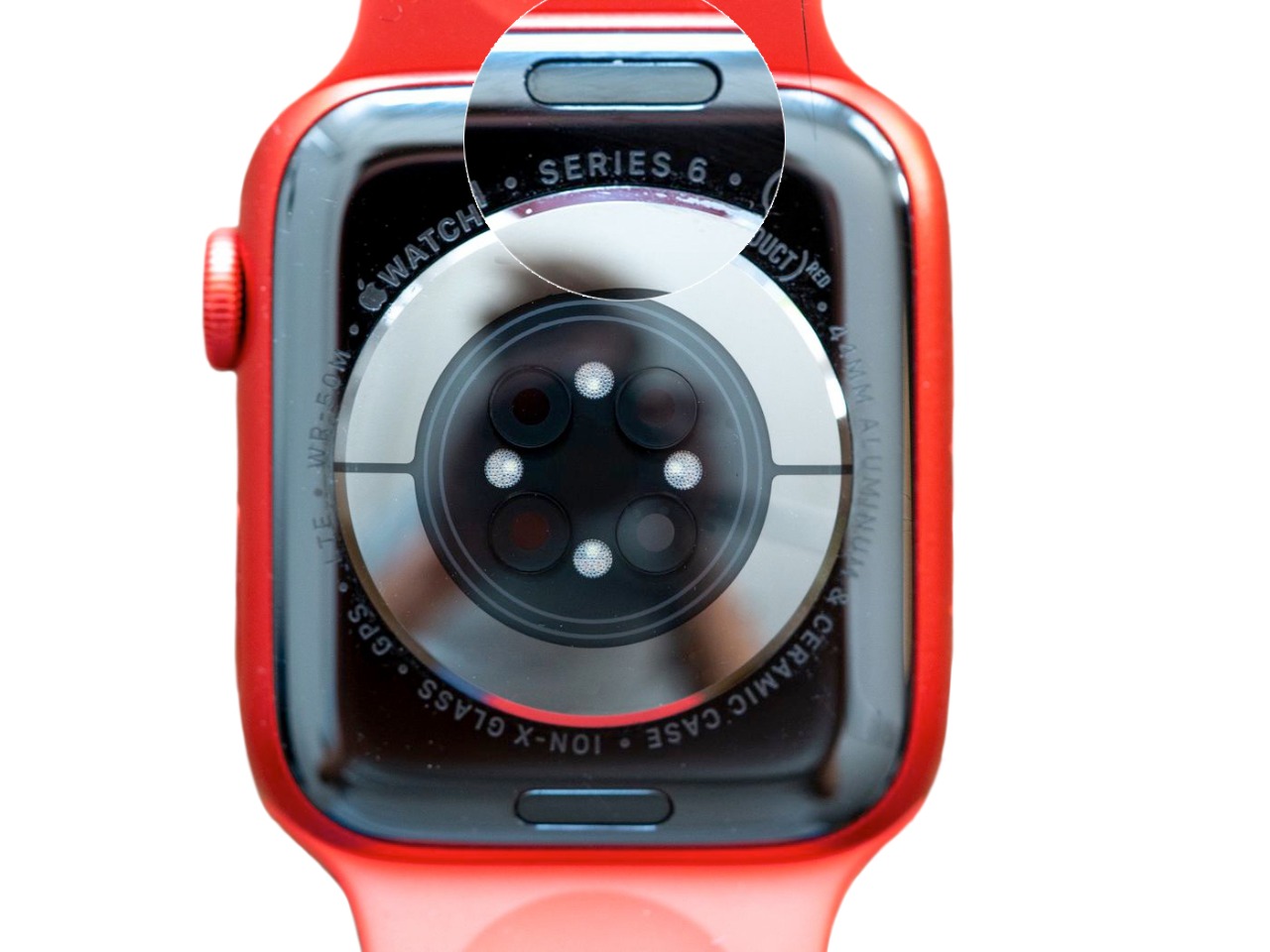
Method 1: Check the back of your Apple Watch
- 1The rear of every Apple Watch is engraved with details about the watch. Simply look at the back of the watch, and you'll discover which Series you own. However, if you possess a Series 1 Watch, you will only see the Apple logo with 'WATCH' beside it. The watch will also feature the case size of your specific model engraved on the back.
Method 2: Identify your Apple Watch with your iPhone
- 1Open the built-in Apple Watch app on your iPhone
- 2Go to My Watch > General > About.
- 3Scroll down to the Model field, where you’ll find a model number beginning with M.
- 4Tap the Model number and you’ll see this change to a model number beginning with “A” followed by four numbers and no slash (for example, A1803) This is the model number of your Apple Watch.
Apple Watch model number lookup
20 models listed. Last updated October 2026.
| Model | Model number | Released | Sell |
|---|---|---|---|
| Apple Watch Series 12 (42mm, 46mm) | A3581, A3583, A3584, A3585, A3582, A3586, A3587, A3588 | 2026 | |
| Apple Watch Ultra 4 (49mm) | A3579, A3580 | 2026 | |
| Apple Watch Series 11 (42mm, 46mm) | A3331, A3333, A3450, A3451, A3335, A3337, A3452, A3453 | 2025 | Sell Apple Watch Series 11 (42mm, 46mm) |
| Apple Watch SE 3 (40mm, 44mm) | A3324, A3325, A3391, A3392, A3326, A3327, A3328, A3329 | 2025 | Sell Apple Watch SE 3 (40mm, 44mm) |
| Apple Watch Ultra 3 (49mm) | A3281, A3282 | 2025 | Sell Apple Watch Ultra 3 (49mm) |
| Apple Watch Series 10 (42mm, 46mm) | A2997, A2998, A2999, A3000, A3001, A3002, A3003, A3206 | 2024 | Sell Apple Watch Series 10 (42mm, 46mm) |
| Apple Watch Ultra 2 (49mm) | A2986, A2987 | 2023 | Sell Apple Watch Ultra 2 (49mm) |
| Apple Watch Series 9 (41mm, 45mm) | A2978, A2980, A2982, A2983, A2984, A2985 | 2023 | Sell Apple Watch Series 9 (41mm, 45mm) |
| Apple Watch Ultra (49mm) | A2622, A2684, A2859 | 2022 | Sell Apple Watch Ultra (49mm) |
| Apple Watch Series 8 (41mm, 45mm) | A2770, A2771, A2772, A2773, A2774, A2775, A2857, A2858 | 2022 | Sell Apple Watch Series 8 (41mm, 45mm) |
| Apple Watch SE 2nd generation (40mm, 44mm) | A2722, A2723, A2724, A2725, A2726, A2727, A2855, A2856 | 2022 | Sell Apple Watch SE 2nd generation (40mm, 44mm) |
| Apple Watch Series 7 (41mm, 45mm) | A2473, A2474, A2475, A2476, A2477, A2478 | 2021 | Sell Apple Watch Series 7 (41mm, 45mm) |
| Apple Watch Series 6 (40mm, 44mm) | A2291, A2292, A2293, A2294, A2375, A2376 | 2020 | Sell Apple Watch Series 6 (40mm, 44mm) |
| Apple Watch SE 1st generation (40mm, 44mm) | A2351, A2352, A2353, A2354, A2355, A2356 | 2020 | Sell Apple Watch SE 1st generation (40mm, 44mm) |
| Apple Watch Series 5 (40mm, 44mm) | A2092, A2093, A2094, A2095, A2156, A2157 | 2019 | Sell Apple Watch Series 5 (40mm, 44mm) |
| Apple Watch Series 4 (40mm, 44mm) | A1977, A1978, A1975, A1976, A2007, A2008 | 2018 | Sell Apple Watch Series 4 (40mm, 44mm) |
| Apple Watch Series 3 (38mm, 42mm) | A1858, A1859, A1860, A1861, A1889, A1890, A1891, A1892 | 2017 | Sell Apple Watch Series 3 (38mm, 42mm) |
| Apple Watch Series 2 (38mm, 42mm) | A1757, A1758, A1816, A1817 | 2016 | Sell Apple Watch Series 2 (38mm, 42mm) |
| Apple Watch Series 1 (38mm, 42mm) | A1802, A1803 | 2016 | Sell Apple Watch Series 1 (38mm, 42mm) |
| Apple Watch 1st generation (38mm, 42mm) | A1553, A1554 | 2015 |