
What model is my iPhone?
What iPhone Do I Have? Here’s the easy way to find out
There are two easy methods to find your iPhone model.
Method 1: Check Settings on your iPhone
- 1Open the Settings app and tap General.
- 2Tap About. The Model Name line shows the name of your iPhone, for example iPhone 15 Pro.
Method 2: Find the A model number
- 1In Settings > General > About, tap the Model Number line once.
- 2It changes from a part number (ending in /A) to the model number, which starts with A, for example A3090.
- 3Match that A-number in the table below.
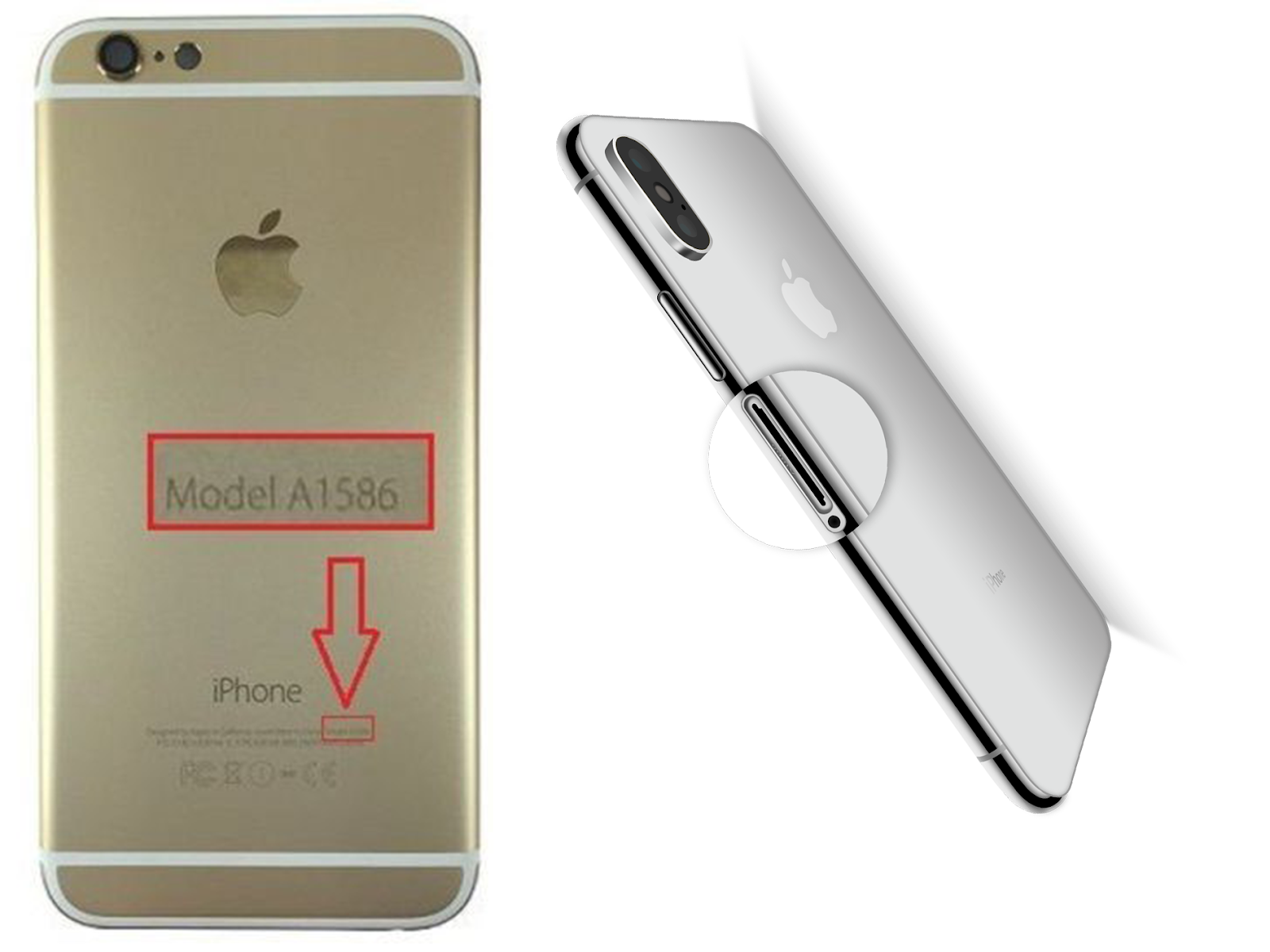
- 4Phone won't turn on? On iPhone 8 and later the A-number is printed inside the SIM tray slot. On iPhone 7 and earlier it is printed on the back.
iPhone model number lookup
46 models listed. Last updated October 2026.
| Model | Model number | Released | Sell |
|---|---|---|---|
| iPhone 18 Pro Max | A3473, A3716, A3718, A3717 | 2026 | |
| iPhone 18 Pro | A3472, A3713, A3715, A3714 | 2026 | |
| iPhone 17e | A3575, A3635, A3634 | 2026 | Sell iPhone 17e |
| iPhone 17 Pro Max | A3257, A3525, A3527, A3526 | 2025 | Sell iPhone 17 Pro Max |
| iPhone 17 Pro | A3256, A3522, A3524, A3523 | 2025 | Sell iPhone 17 Pro |
| iPhone 17 | A3258, A3519, A3521, A3520 | 2025 | Sell iPhone 17 |
| iPhone Air | A3260, A3516, A3518, A3517 | 2025 | Sell iPhone Air |
| iPhone 16e | A3212, A3408, A3410, A3409 | 2025 | Sell iPhone 16e |
| iPhone 16 Pro Max | A3084, A3295, A3297, A3296 | 2024 | Sell iPhone 16 Pro Max |
| iPhone 16 Pro | A3083, A3292, A3294, A3293 | 2024 | Sell iPhone 16 Pro |
| iPhone 16 Plus | A3082, A3289, A3291, A3290 | 2024 | Sell iPhone 16 Plus |
| iPhone 16 | A3081, A3286, A3288, A3287 | 2024 | Sell iPhone 16 |
| iPhone 15 Pro Max | A2849, A3105, A3108, A3106 | 2023 | Sell iPhone 15 Pro Max |
| iPhone 15 Pro | A2848, A3101, A3104, A3102 | 2023 | Sell iPhone 15 Pro |
| iPhone 15 Plus | A2847, A3093, A3096, A3094 | 2023 | Sell iPhone 15 Plus |
| iPhone 15 | A2846, A3089, A3092, A3090 | 2023 | Sell iPhone 15 |
| iPhone 14 Pro Max | A2651, A2893, A2896, A2895, A2894 | 2022 | Sell iPhone 14 Pro Max |
| iPhone 14 Pro | A2650, A2889, A2892, A2891, A2890 | 2022 | Sell iPhone 14 Pro |
| iPhone 14 Plus | A2632, A2885, A2888, A2887, A2886 | 2022 | Sell iPhone 14 Plus |
| iPhone 14 | A2649, A2881, A2884, A2883, A2882 | 2022 | Sell iPhone 14 |
| iPhone SE (3rd generation) | A2595, A2782, A2784, A2785, A2783 | 2022 | Sell iPhone SE (3rd generation) |
| iPhone 13 Pro Max | A2484, A2641, A2644, A2645, A2643 | 2021 | Sell iPhone 13 Pro Max |
| iPhone 13 Pro | A2483, A2636, A2639, A2640, A2638 | 2021 | Sell iPhone 13 Pro |
| iPhone 13 | A2482, A2631, A2634, A2635, A2633 | 2021 | Sell iPhone 13 |
| iPhone 13 mini | A2481, A2626, A2629, A2630, A2628 | 2021 | Sell iPhone 13 mini |
| iPhone 12 Pro Max | A2342, A2410, A2412, A2411 | 2020 | Sell iPhone 12 Pro Max |
| iPhone 12 Pro | A2341, A2406, A2408, A2407 | 2020 | Sell iPhone 12 Pro |
| iPhone 12 | A2172, A2402, A2404, A2403 | 2020 | Sell iPhone 12 |
| iPhone 12 mini | A2176, A2398, A2400, A2399 | 2020 | Sell iPhone 12 mini |
| iPhone SE (2nd generation) | A2275, A2298, A2296 | 2020 | Sell iPhone SE (2nd generation) |
| iPhone 11 Pro Max | A2161, A2220, A2218 | 2019 | Sell iPhone 11 Pro Max |
| iPhone 11 Pro | A2160, A2217, A2215 | 2019 | Sell iPhone 11 Pro |
| iPhone 11 | A2111, A2223, A2221 | 2019 | Sell iPhone 11 |
| iPhone XS Max | A1921, A2101, A2102, A2103, A2104 | 2018 | Sell iPhone XS Max |
| iPhone XS | A1920, A2097, A2098, A2099, A2100 | 2018 | Sell iPhone XS |
| iPhone XR | A1984, A2105, A2106, A2107, A2108 | 2018 | Sell iPhone XR |
| iPhone X | A1865, A1901, A1902 | 2017 | Sell iPhone X |
| iPhone 8 Plus | A1864, A1897, A1898 | 2017 | Sell iPhone 8 Plus |
| iPhone 8 | A1863, A1905, A1906 | 2017 | Sell iPhone 8 |
| iPhone 7 Plus | A1661, A1784, A1785 | 2016 | |
| iPhone 7 | A1660, A1778, A1779 | 2016 | |
| iPhone SE (1st generation) | A1723, A1662, A1724 | 2016 | |
| iPhone 6s Plus | A1634, A1687, A1699 | 2015 | |
| iPhone 6s | A1633, A1688, A1700 | 2015 | |
| iPhone 6 Plus | A1522, A1524, A1593 | 2014 | |
| iPhone 6 | A1549, A1586, A1589 | 2014 |